Altimeter
Learn how aircraft altimeters use static pressure, how to read and set them, types of altitude, common errors, cold-weather corrections, and preflight checks.
Introduction to Altimeter
- An altimeter is a type of barometer that measures the vertical distance to the surface, necessary for a pilot to maintain the desired or assigned altitude during flight.
- Barometric altimeters require a current altimeter setting to be maintained because atmospheric pressure varies with location and time.
- Altimeters function by converting static pressure into an altitude indication in feet or meters.
- Different types of altimeters measure different types of altitude.
- Altimeters are subject to inaccuracies and errors.
- Cold-temperature corrections and abnormal-pressure procedures help pilots maintain terrain clearance and a common altitude reference.
- Altitude-reporting equipment, including encoding altimeters, supplies pressure-altitude information to the transponder.
- Pilots use preflight checks and verify regulatory compliance to identify discrepancies before flight.
- Integrated flight decks combine air-data information with systems such as Inertial Reference Units (IRU), Inertial Navigation Systems (INS), and Attitude Heading Reference Systems (AHRS).
- Barometric altitude still depends on pressure sensing rather than inertial or attitude sensing alone.
- As with any system or instrument, anomalies and malfunctions are possible, requiring detailed knowledge of the indicator and related systems.
- Reinforce your understanding of Altimeter by completing the knowledge quiz and interactive scenario, comparing your performance with the applicable Airman Certification Standards, and reviewing the topic summary before moving on.
Altimeter Key Highlights
- The altimeter measures aircraft altitude by sensing changes in atmospheric pressure during flight.
- Altimeters use aneroid wafers that expand and contract as static air pressure changes with altitude.
- Pilots must set the current altimeter setting to ensure accurate altitude indications relative to mean sea level.
- Pressure altitude, density altitude, indicated altitude, and true altitude are different altitude references used in aviation operations.
- Improper altimeter settings can result in altitude errors that affect terrain clearance and aircraft separation.
- Temperature variations and nonstandard atmospheric conditions can reduce altimeter accuracy and affect true altitude.
- Altimeter errors may occur due to blocked static ports, instrument malfunction, or rapid pressure changes.
- Modern glass cockpit systems display altitude information electronically while still relying on pressure-sensing systems.
- Pilots should cross-check altitude indications with published altitudes, terrain awareness, and other flight instruments.
- Understanding altimeter operation improves navigation accuracy, airspace compliance, and overall flight safety.
Pitot-Static System
- Pitot-static systems supply dynamic pressure (ram/forced air) and static pressure to certain flight instruments.
- The airspeed indicator, altimeter and vertical speed indicator use the Pitot Static system.
- The system has two primary pressure sources:
-
Pitot Tube:
- Invented by Henri Pitot in 1732, the Pitot tube measures fluid flow (air) velocity.
- The forward-facing opening admits dynamic pressure (ram/forced air) into the pitot tube.
- The device's placement is often on the front of the aircraft or an airfoil to capture smooth (undisturbed) air and reduce position errors. []
- A small drain hole on the back of the pitot tube allows moisture to escape, helping prevent water from collecting in the pitot system.
-
Pitot Heat:
- Pitot Tubes are often electrically heated, which can prevent and remove ice accumulation. []
- Use pitot heat according to the Pilot's Operating Handbook/Airplane Flight Manual (POH/AFM), including any ground-operation limits.
- Unnecessary ground operation can overheat or damage some pitot heaters.
- When airborne, the airflow cools the device.
-
Static Port:
- Static ports sense ambient atmospheric pressure.
- Typically, ports are flush mounted on the side of the aircraft where air is undisturbed. []
- Some aircraft use heated static ports to prevent ice blockage.
- Static ports on opposite sides of the fuselage further reduce pressure (position) errors during slips and skids.
- The POH/AFM contains any corrections to the airspeed for the various flaps and landing gear configurations.
-
Alternate Static Source:
- An alternate static air source valve is available for abnormal situations on some aircraft.
- If the alternate source draws air from inside the cabin, where pressure is usually lower than outside, selecting it may produce the following indications:
- The altimeter reads higher than normal.
- Indicated airspeed (IAS) reads greater than normal.
- VSI momentarily shows a climb.
- Many POHs provide a correction table and aircraft-specific instructions for when operating with an alternate static source. []
- The altimeter's barometric setting does not correct errors caused by the alternate static source; use the POH/AFM corrections.
- An alternate static source may also affect connected altitude-reporting and flight-control equipment; check the aircraft-specific system description.
- Using alternate static sources can also decrease the accuracy beyond the 75 feet recommendation outlined in the Aeronautical Information Manual.


Altimeter Function and Design
- Altimeters indicate vertical distance above a reference, such as mean sea level (MSL) or the terrain beneath the aircraft (above ground level, AGL), depending on the instrument and setting.
- A conventional mechanical pressure altimeter uses evacuated aneroid capsules connected to the instrument pointers through gears and linkages.
- As the aircraft climbs, decreasing static pressure allows the capsules, which are calibrated to 29.92 inHg, to expand, moving the pointers to indicate a higher altitude.
- As the aircraft descends, increasing static pressure causes the capsules to contract, moving the pointers to indicate a lower altitude.
- The Kollsman window allows the pilot to adjust for nonstandard pressure, but does not correct temperature error. []
- Air Traffic Control (ATC) provides local altimeter settings so pilots can use a common pressure reference.
- Changing the pressure setting by 1 inch of mercury (in-Hg) changes indicated altitude by approximately 1,000 feet.
- Obtain the current setting from sources such as Automated Weather Observing System (AWOS), Automated Surface Observing System (ASOS), or Automatic Terminal Information Service (ATIS) broadcasts.
- With the current local setting, the altimeter indicates altitude referenced to MSL; temperature and instrument errors can still make indicated altitude differ from true altitude.
- Local altimeter settings do not account for distance above land features such as hills, mountains, or valleys.
- If set to the local field elevation prior to takeoff, such as the case with gliders, the altimeter will show height above the ground (absolute altitude), but not above sea level (sea level)
- The altimeter functions like a barometer, detecting pressure differences from a standard (29.92 in-Hg, aka, absolute pressure) using the static system
- On some altimeters, a striped warning area is visible below 10,000 feet and is progressively covered between 10,000 and 15,000 feet.

Types of Altimeters
- Different altimeters measure altitude through various methods such as radio, radar, laser, or capacitive technology.
-
Drum Type:
- The illustrated drum-type altimeter has one pointer that makes one revolution per 1,000 feet. []
- On this display, each numbered interval represents 100 feet and each small graduation represents 20 feet.
- A drum, marked in thousands of feet, is geared to the mechanism that drives the pointer
- Read the drum first for thousands of feet, then the pointer for hundreds and tens of feet.
-
Sensitive Altimeter:
- A sensitive altimeter has an adjustable barometric scale that lets the pilot select the reference pressure. []
- This scale is visible in a small window called the Kollsman window
- A knob on the instrument adjusts the scale
- A common setting range is 28.00 to 31.00 in-Hg, approximately 948 to 1,050 millibars; verify the limits of the installed instrument.
-
Absolute Altimeter:
- A radio altimeter measures height above the surface beneath the aircraft using transmitted and reflected radio pulses.
-
Radio Altimeters:
- The radio altimeter (also known as radar altimeter or RADALT) is a safety-critical aircraft system used to determine an aircraft's height above terrain.
- Unlike a pressure altimeter, a radio altimeter directly measures clearance above the reflecting surface within its operating limits.
- Information from radio altimeters is essential for flight operations as a main enabler of several safety-critical functions and systems on the aircraft.
- Radio-altimeter receivers are extremely sensitive to be able to detect weak reflected signals, making them susceptible to radio frequency interference (RFI).
- RFI in the C-band portion of the spectrum could impact the functions of the radio altimeter during any phase of flight—most critically during takeoff, approach, and landing phases.
- This could pose a serious risk to flight safety.
- Installed radio altimeters normally supply critical height data to a wide range of automated safety systems, navigation systems, and cockpit displays.
- Harmful RFI affecting the radio altimeter can cause these safety and navigation systems to operate in unexpected ways and display erroneous information to the pilot.
- RFI can interrupt, or significantly degrade, radio altimeter functions—precluding radio altimeter-based terrain alerts and low-visibility approach and landing operations.
- Affected systems can include Terrain Awareness and Warning Systems (TAWS), Enhanced Ground Proximity Warning Systems (EGPWS), and Traffic Collision Avoidance Systems (TCAS).
- Pilots of radio altimeter equipped aircraft should become familiar with the radio altimeter's interdependence with the other aircraft systems and expected failure modes and indications that may be associated with harmful interference.
- Recognizing interference/anomalies in the radio altimeter can be difficult, as it may present as inoperative or erroneous data.
- Monitor radio-altimeter and automation indications for discrepancies, and be prepared to follow the applicable abnormal procedures.
- If radio-altimeter interference or anomalies occur, follow aircraft procedures, transition to operations that do not require the radio altimeter, and inform ATC.
- In Flight Reports: Pilots should report any radio altimeter anomaly experienced to ATC as soon as practical.
- After flight, submit a detailed report as soon as practical using the FAA Radio Altimeter Anomaly Reporting Form.
- The post flight pilot reports of radio altimeter anomalies should contain as much of the following information as applicable:
- Date and time the anomaly was observed;
- Location of the aircraft at the time the anomaly started and ended (e.g., latitude, longitude or bearing/distance from a reference point or navigational aid);
- Magnetic heading;
- Altitude (MSL/AGL);
- Aircraft Type (make/model);
- Flight Number or Aircraft Registration Number;
- Meteorological conditions;
- Type of radio altimeter in use (e.g., make/model/software series or version), if known;
- Event overview;
- Consequences/operational impact (e.g., impacted equipment, actions taken to mitigate the disruption and/or remedy provided by ATC, required post flight pilot and maintenance actions).
- The radio altimeter (also known as radar altimeter or RADALT) is a safety-critical aircraft system used to determine an aircraft's height above terrain.


Types of Altitude
- Altitude is the vertical distance above a specified reference.
-
Absolute altitude:
- The height of an aircraft above the terrain over which it is flying.
- Absolute altitude is commonly expressed as AGL.
- Height Above Airport (HAA), Height Above Touchdown (HAT), and Threshold Crossing Height (TCH) use specific reference elevations for procedures and charted minima.
-
Indicated Altitude:
- Indicated altitude is the uncorrected reading shown by the altimeter with the current altimeter setting selected.
-
True Altitude:
- True altitude is the actual vertical distance above MSL; charted terrain and airport elevations use this reference.
- At a given indicated altitude and altimeter setting, true altitude varies with the temperature of the air column below the aircraft.
- A warmer air column places the aircraft at a higher true altitude for the same indicated altitude.
- A colder air column places the aircraft at a lower true altitude for the same indicated altitude.
- This relationship is due to warm air expanding, causing pressure levels to rise.
-
Pressure Altitude:
- Pressure altitude is the altitude indicated with 29.92 in-Hg (approximately 1,013.2 millibars) selected, representing the altitude in the standard atmosphere with the same pressure.
- Calculate pressure altitude.
- Remember LAGS: Less Add, Greater Subtract when estimating pressure altitude from field elevation:
- If the altimeter setting is less than 29.92 in-Hg, add approximately 1,000 feet per in-Hg of difference to field elevation.
- If the altimeter setting is greater than 29.92 in-Hg, subtract approximately 1,000 feet per in-Hg of difference from field elevation.
- See more here in the atmosphere section
-
Density Altitude:
- Density altitude is pressure altitude corrected for nonstandard temperature.
- Density altitude is important when evaluating aircraft performance, especially takeoff distance and climb capability.
- Calculate density altitude.
- See more here in the atmosphere section
-
GPS Altitude:
- Global Positioning System (GPS) altitude is derived from satellite positioning rather than atmospheric pressure.
- GPS determines geometric height relative to the World Geodetic System 1984 (WGS 84) reference ellipsoid.
- Receivers may use a geoid model to display an altitude referenced to MSL; check the equipment documentation.
- GPS altitude displayed on an electronic flight bag may differ from the barometric altimeter reading.
- Different reference surfaces, atmospheric conditions, and measurement errors can produce differences between GPS and barometric altitude.
- Use barometric altitude for assigned altitudes and flight levels; though accurate, GPS altitude is not a substitute for the required barometric reference.
- Using the prescribed altimeter setting gives aircraft a common altitude reference for separation.
-
Service and Absolute Ceilings:
- Service ceiling and absolute ceiling are aircraft performance limits expressed as altitudes; they are not separate types of altimeter indication and are not weather cloud ceilings.
- The service ceiling is reached when maximum climb performance is reduced to 100 feet per minute, while the absolute ceiling is reached when maximum rate of climb is zero.
- Use the applicable Pilot's Operating Handbook (POH) or Aircraft Flight Manual (AFM) and actual atmospheric conditions to determine available performance.
Altimeter Inaccuracies and Errors
- There are several factors which can impact an aircraft altimeter, inducing inaccuracies and errors.
- At higher altitudes, setting the altimeter to 29.92 inches of mercury eliminates station barometer errors, some altimeter instrument errors, and errors caused by altimeter settings derived from different geographical sources.
- Extreme caution must be exercised when operating in proximity to obstructions or terrain, especially in cold temperatures that cause a large differential between the standard day temperature and actual temperature.
- The same is true when operating at low pressures.
- Low temperature and pressures can cause serious errors that result in the aircraft being significantly lower than the indicated altitude.
- Pilots should apply corrections for static pressure systems and/or instruments, if appreciable errors exist
-
Instrument Errors:
- Manufacturing standards, installation requirements, and the tests specified in 14 CFR (Code of Federal Regulations) Part 43, Appendix E help control instrument and installation errors; use the following ground altimeter check to identify a possible indication error:
- Set the current reported airfield altimeter setting on the altimeter setting scale.
- Read the altitude on the altimeter.
- The altitude should read the known field elevation if you are located on the same reference level used to establish the altimeter setting.
- If the indication differs from the known reference elevation by 75 feet or more, altimeter accuracy is questionable; refer the discrepancy to an appropriately rated repair station for evaluation.
- Selecting an alternate static source can introduce an additional indication error; use the aircraft-specific correction data.
-
Inherent Altimeter Errors:
- When the aircraft is flying in air that is warmer than standard, the air is less dense and the pressure levels are farther apart
- When the aircraft is flying at an indicated altitude of 5,000', the pressure level for that altitude is higher than it would be in air at standard temperature, and the aircraft is higher than it would be if the air were cooler
- If the air is colder than standard, it is denser and the pressure levels are closer together
- When the aircraft is flying at an indicated altitude of 5,000', its true altitude is lower than it would be if the air were warmer.
- When the aircraft is flying in air that is warmer than standard, the air is less dense and the pressure levels are farther apart
-
Mechanical Errors:
- Errors with the instrument itself
- If the ground check differs from the known reference elevation by 75 feet or more, follow the AIM guidance and refer the discrepancy to an appropriately rated repair station.
- Nonstandard atmospheric pressure and temperature can also cause indication errors even when the instrument is mechanically serviceable.
- Manufacturing standards, installation requirements, and the tests specified in 14 CFR (Code of Federal Regulations) Part 43, Appendix E help control instrument and installation errors; use the following ground altimeter check to identify a possible indication error:
-
Static-Source Position Error and Setting Limits:
- Many aircraft altimeters cannot be adjusted above 31.00 inches of mercury.
- When an aircraft’s altimeter cannot be set to a pressure setting above 31.00 inches of mercury, true altitude will be higher than the altitude indicated on the barometric altimeter.
- Aircraft whose altimeters can be set above 31.00 inches of mercury, when operating into airports that can measure settings above 31.00 inches of mercury, have no additional restrictions.
- An abnormal low-pressure condition exists when barometric pressure is below 28.00 inches of mercury. Flight operations are not recommended when an aircraft’s altimeter cannot be set below 28.00 inches of mercury.
- In this situation, true altitude is lower than indicated and may be significantly lower in extremely cold temperatures.
- Use extreme caution near obstructions or terrain in low pressures and/or low temperatures.
- Position error occurs when airflow around the aircraft causes pressure at the static ports to differ from undisturbed ambient pressure.
- Many aircraft altimeters cannot be adjusted above 31.00 inches of mercury.
- A pressure altimeter uses a standard-atmosphere model; pilots must account for nonstandard conditions using current settings and applicable correction procedures.
-
Non-Standard Temperature:
- Temperature has an effect on the accuracy of barometric altimeters, indicated altitude, and true altitude.
- When the column of air is warmer than standard, you are higher than your altimeter indicates.
- Subsequently, when the column of air is colder than standard, you are lower than indicated.
- Standard temperature at sea level is 15 degrees Celsius (59° Fahrenheit)
- The temperature gradient from sea level is minus 2° Celsius (3.6° Fahrenheit) per 1,000'
- See the atmosphere page for more
- Pilots should apply corrections for static pressure systems and/or instruments, if appreciable errors exist
- The temperature gradient from sea level is minus 2° Celsius (3.6° Fahrenheit) per 1,000'
- Temperature error depends on the air column's departure from standard temperature (at altitude) and the aircraft's height above the altimeter-setting source.
- It is these "differences" and their magnitude that determine the error in indicated altitude.
- Temperature error can exist even when no cold-temperature correction is required by an approach chart; a GPS comparison does not replace the applicable correction procedures.
- When flying into a cooler air mass while maintaining a constant indicated altitude, true altitude decreases.
- Whether true altitude remains above indicated depends on how the actual temperature compares with the standard temperature at that altitude.
- At 10,000 feet, standard temperature is −5 degrees Celsius (C). If the outside air temperature decreases from +5 degrees C to 0 degrees C, it remains warmer than standard, so true altitude remains above indicated even though it decreases as the air cools.
- In low temperatures, use extreme caution when flying near obstructions or terrain.
- Nonstandard temperatures affect barometric vertical navigation (Baro-VNAV) guidance on final approach.
- Warmer-than-standard air produces a steeper actual descent path and, at the same groundspeed, a higher descent rate.
- Colder-than-standard air produces a shallower actual descent path and, at the same groundspeed, a lower descent rate.
- Observe the charted Baro-VNAV temperature limits and consider the effects on approach minima, power settings, and visual cues.
-
Nonstandard Pressure Effects on an Altimeter:
- It is important to set the current altimeter settings for the area of operation when flying at an enroute altitude that does not require a standard altimeter setting of 29.92 "Hg. []
- If the altimeter is not set to the current altimeter setting when flying from an area of high pressure into an area of low pressure, the aircraft will be closer to the surface than the altimeter indicates.
- An altimeter-setting error of 1 in-Hg corresponds to approximately 1,000 feet of indicated-altitude error.
- For example, setting 29.90 in-Hg instead of 30.90 in-Hg makes the indicated altitude approximately 1,000 feet too low.
- Remember: High to low, look out below when pressure decreases and the altimeter setting is not updated.
- Maintain a current altimeter setting because atmospheric pressure varies along the route.
- That is, in one location the pressure might be higher than the pressure just a short distance away
- Consider an aircraft departing an area where the local altimeter setting is 29.92 in-Hg.
- If the aircraft maintains indicated altitude while moving to an area of lower pressure (Point A to B in []) and the pilot fails to readjust the altimeter setting (essentially calibrating it to local pressure), then as the pressure decreases, the true altitude will be lower
- In the illustrated example, maintaining 5,000 feet indicated without updating the setting results in a true altitude of only 3,500 feet at Point B.
- The fact that the altitude indication is not always true lends itself to the memory aid, "When flying from hot to cold or from a high to a low, look out below"
-
High Barometric Pressure:
- Cold, dry air masses may produce barometric pressures in excess of 31.00 inches of Mercury.
- Many altimeters do not have the means to adjust for settings of these levels.
- In this case, the aircraft actual altitude will be higher than the altimeter indicates.
-
Low Barometric Pressure:
- When abnormally low barometric pressure conditions occur (below 28.00 inches of mercury), flight operations by aircraft unable to set the actual altimeter setting are not recommended.
- This is different from high barometric pressure because the aircraft's true altitude is lower than the indicated altitude.
- This situation may be exacerbated when operating in extremely cold temperatures, which may result in the aircraft's true altitude being significantly lower than the indicated altitude.
- When abnormally low barometric pressure conditions occur (below 28.00 inches of mercury), flight operations by aircraft unable to set the actual altimeter setting are not recommended.
- For instances where atmospheric pressure is notably higher or lower, specific altimeter procedures must be followed
- It is important to set the current altimeter settings for the area of operation when flying at an enroute altitude that does not require a standard altimeter setting of 29.92 "Hg. []


Cold Temperature Altimeter Procedures
- A correctly calibrated pressure altimeter indicates true altitude when pressure and temperature follow the International Standard Atmosphere (ISA).
- The current local altimeter setting compensates for nonstandard surface pressure; it does not remove temperature error.
- Temperature errors from ISA result in true altitude being higher than indicated altitude whenever the temperature is warmer than ISA and true altitude being lower than indicated altitude whenever the temperature is colder than ISA
- In colder-than-standard air, true altitude below indicated altitude reduces obstacle clearance.
- Under extremely cold conditions, pilots may need to apply a temperature correction to charted IFR altitudes to ensure terrain and obstacle clearance. []
- Pilots must request ATC approval before applying a cold-temperature correction to any ATC-assigned altitude.
- If an assigned altitude may not provide adequate terrain or obstacle clearance, advise ATC and request an amended clearance.
- When applying corrections to approach-segment altitudes, advise ATC of the corrected altitude except for the final segment (the new MDA or DA).
- Pilots must request ATC approval before applying a cold-temperature correction to any ATC-assigned altitude.
- Plan for a Cold Temperature Airport (CTA) before departure.
- Use the predicted coldest temperature for plus or minus 1 hour of the estimated time of arrival and compare against the CTA published temperature.
- If the predicted temperature is at or below the CTA temperature, calculate the altitude correction using the chart. []
- Use the planned correction only if the actual arrival temperature matches the temperature used in planning; otherwise, recalculate for the actual conditions.
- Use the International Civil Aviation Organization (ICAO) Cold Temperature Error Table to estimate how far below indicated altitude the aircraft may be. []
- Enter the table with the reported airport temperature and height above the airport (flight altitude minus airport elevation).
- Add the applicable correction to the charted altitude; do not change the altimeter setting to make a temperature correction.
- Do not apply CTA corrections to published Standard Instrument Departure (SID), Obstacle Departure Procedure (ODP), or Standard Terminal Arrival (STAR) altitudes.
-
ICAO Cold Temperature Error Table:
- The cold temperature induced altimeter error may be significant when considering obstacle clearances when temperatures are well below standard. []
- When flying in extreme cold, pilots may need to increase minimum terrain-clearance altitudes and require correspondingly higher cloud ceilings.
- Some flight management systems (FMS) provide temperature compensation.
- Follow the AFM, supplement, or system manual to determine which altitudes are corrected and when compensation is active.
- Pilots must request approval from ATC to apply a cold temperature correction to any ATC-assigned altitude.
- Otherwise, vertical separation from other aircraft may be reduced, creating a potentially hazardous situation
- To use the table, find the reported temperature in the left column, and then read across the top row to the height above the airport/reporting station.
- Calculate height above the airport by subtracting airport elevation from the altitude being evaluated, such as the final approach fix (FAF) altitude.
- The intersection of the column and row is the amount of possible error.
- For example, the reported airport temperature is -10°C and the FAF is 500 feet above airport elevation.
- The displayed table gives a 50-foot cold-temperature correction at -10°C and 500 feet above the airport.
- This number represents how far the aircraft may be below the indicated altitude due to possible cold temperature induced error. []
- Add the correction to the relevant approach altitude while keeping the current altimeter setting selected.
- Use the corrected decision altitude (DA) or minimum descent altitude (MDA), and comply with ATC coordination requirements.
- Pilots must correct the published “at,” “at or above,” and “at or below” altitudes on all designated segments, for all runways and published instrument approach procedures, when the reported airport temperature is at or below the CTA temperature published on the approach plate.
- Pilots must ensure compensating aircraft are correcting on the proper segment or segments of the approach.
- If temperature compensation is unavailable, inoperative, or not used, calculate and apply corrections manually.
- Use the cold-temperature table for the affected approach segments. []
- Pilots must advise ATC of the corrected altitude when applying an altitude correction on any approach segment, except the final segment.
- A pilot may request an altitude correction on any approach at any U.S. airport when extreme cold temperature is encountered.
- Cold-temperature errors reduce terrain clearance when flying at a charted minimum altitude.
- Apply required corrections and coordinate any additional correction with ATC as applicable.
- For example, at -10°C and 1,000 feet above airport elevation, the displayed table gives a 90-foot correction, which may be rounded up to 100 feet.
- Cold-temperature error increases with height above the reporting station and with the degree of cold relative to standard conditions.
- For IFR approach procedures, the reporting station elevation is assumed to be airport elevation
- Use the temperature reported at the airport and the height above airport elevation, not the temperature at flight altitude or the charted MSL altitude alone when applying corrections.
- The following example calculates corrections for individual altitudes, rounding each correction up to the next 100 feet:
- Airport Elevation: 496'
- Airport Temperature: - 50°C
- A charted IFR approach to the airport provides the following data:
- Minimum Procedure Turn Altitude: 1,800'
- Minimum FAF Crossing Altitude: 1,200'
- Straight-in Minimum Descent Altitude: 800'
- Circling MDA: 1,000'
- The Minimum Procedure Turn Altitude of 1,800' will be used as an example to demonstrate determination of the appropriate temperature correction
- For this example, round each calculated correction up to the next 100 feet; do not round the airport elevation before calculating height above it.
- The charted procedure-turn altitude of 1,800 feet minus the airport elevation of 496 feet equals 1,304 feet above the airport.
- A height of 1,304 feet falls between the table columns for 1,000 and 1,500 feet above the airport.
- At the station temperature of -50°C, the correction falls between 300' and 450'
- For linear interpolation, divide the 150-foot difference in correction by the 500-foot difference in height.
- 150 ÷ 500 = 0.30 foot of additional correction per foot of height above 1,000 feet.
- The correction is 300 + (0.30 × 304) = 391.2 feet, rounded up to 400 feet.
- Add the 400-foot correction to the charted 1,800-foot altitude to obtain 2,200 feet indicated.
- Flying the corrected indicated altitude compensates for the estimated cold-temperature error; the table does not guarantee an exact true altitude.
- Procedure-turn altitude: 1,800 feet charted + 400 feet correction = 2,200 feet indicated.
- Minimum FAF crossing altitude: 1,200 feet charted + 300 feet correction = 1,500 feet indicated.
- Straight-in MDA: 800 feet charted + 100 feet correction = 900 feet indicated.
- Circling MDA: 1,000 feet charted + 200 feet correction = 1,200 feet indicated.
- The cold temperature induced altimeter error may be significant when considering obstacle clearances when temperatures are well below standard. []


Abnormal Atmospheric Pressure Altimeter Procedures
- The aircraft cruising altitude or flight level is maintained by referencing the barometric altimeter
- Use the applicable pressure-setting procedures below:
Below 18,000' MSL:
-
Barometric pressure is 31.00 in-Hg or less:
- Use a current reported altimeter setting from a station along the route and within 100 nautical miles (NM) of the aircraft.
- If no station is available within that area, use the current reported setting from an appropriate available station.
- If the aircraft is not equipped with a radio, set the altimeter to the elevation of the departure airport or use an available appropriate altimeter setting prior to departure.
-
Barometric pressure exceeds 31.00 in-Hg:
- When pressure exceeds 31.00 in-Hg, a Notice to Airmen (NOTAM) will define the affected area and applicable procedures:
- For all aircraft: Set 31.00 inches for en route operations below 18,000 feet MSL.
- Maintain this setting until beyond the affected area or until reaching the beginning of the final approach segment on an instrument approach.
- While approaching the final approach segment, set the current altimeter setting above 31.00 inches of mercury, if possible.
- If no current altimeter setting is available, or if a setting above 31.00" Hg. cannot be made on the aircraft's altimeter, leave 31.00" Hg. set in the altimeter and continue the approach.
- Set 31.00 "Hg. in the altimeter prior to reaching the lowest of any mandatory/crossing altitudes or 1,500 feet above ground level (AGL) when on a departure or missed approach.
- Air traffic control will issue actual altimeter settings and advise pilots to set 31.00 inches in their altimeters for en route operations below 18,000 feet MSL in affected areas.
- Aircraft whose altimeters can be set above 31.00 inches of mercury, when operating into airports that can measure settings above 31.00 inches of mercury, have no additional restrictions.
- Flight operations are restricted to VFR weather conditions to and from an airport that is unable to accurately measure barometric pressures above 31.00 inches of mercury.
- These airports will report the barometric pressure as "missing" or "in excess of 31.00" Hg".
- Visual flight rules (VFR) operations have no additional high-pressure restrictions, but require extra diligence in flight planning and operation.
- For instrument flight rules (IFR) operations when the aircraft altimeter cannot be set above 31.00 in-Hg, apply these restrictions:
- When evaluating departure alternates, destinations, and destination alternates, increase the applicable ceiling and visibility requirements if the aircraft altimeter cannot be set above 31.00 in-Hg.
- Round the reported or forecast excess above 31.00 in-Hg up to the next tenth.
- Add 100 feet of ceiling and 1/4 statute mile of visibility for each 0.10 in-Hg of rounded excess.
- Apply the adjusted values under the applicable operating regulations and operations specifications.
- For example, the destination setting is 31.21 in-Hg and the planned instrument landing system (ILS) approach has weather requirements of a 200-foot ceiling and 1/2 statute mile visibility.
- The pressure excess is 31.21 - 31.00 = 0.21 in-Hg, rounded up to 0.30 in-Hg.
- Add 300 feet of ceiling and 3/4 statute mile of visibility.
- The adjusted weather requirements are 500 feet and 1 1/4 statute miles; this calculation changes planning weather requirements, not the published DA or MDA.
- On approach, 31.00" Hg. will remain set during the complete instrument approach.
- The aircraft has arrived at the DA or minimum descent altitude (MDA) when the published DA or MDA is displayed on the barometric altimeter.
- Although visibility is normally the limiting factor on an approach, pilots should be aware that when reaching the DA or MDA, the aircraft will be higher than indicated by the barometric altimeter.
- For 31.21 in-Hg actual pressure with 31.00 selected, the pressure-setting difference alone places the aircraft approximately 210 feet higher than indicated; the 300-foot planning increase comes from rounding.
- These restrictions do not apply to authorized Category II/III ILS operations and certificate holders using approved atmospheric pressure at aerodrome elevation (QFE) altimetry systems.
- Air Traffic Organization (ATO) Service Center Directors may authorize temporary waivers to high barometric pressure flying NOTAM requirements within their areas of jurisdiction for emergency supply, transport, or medical services under 14 CFR § 91.144(b).
- When evaluating departure alternates, destinations, and destination alternates, increase the applicable ceiling and visibility requirements if the aircraft altimeter cannot be set above 31.00 in-Hg.
- When pressure exceeds 31.00 in-Hg, a Notice to Airmen (NOTAM) will define the affected area and applicable procedures:
-
-
At or above 18,000' MSL:
- In the United States, select 29.92 in-Hg when operating at or above 18,000 feet MSL (in the flight levels).
- Because VFR aircraft may operate at 17,500 feet MSL, low atmospheric pressure can lower the true altitude of aircraft at FL180, reducing the nominal 500-foot altitude difference from VFR traffic. Remember, “when flying high to low, look out below.”
- ATC will assign the lowest usable flight level, which is determined by the atmospheric pressure in the area of operation as shown in []
- When the minimum altitude per 14 CFR Section 91.119 and 14 CFR Section 91.177 is above 18,000 feet MSL, the lowest usable flight level must be the flight level equivalent of the minimum altitude plus the number of feet specified in []
- ATC will accomplish this calculation.
- For example, with a minimum route altitude of 19,000 feet MSL and an altimeter setting is reported between 29.92 and 29.43 in-Hg, add 500 feet under 14 CFR 91.121(c) to obtain a minimum flight level of FL195.
- ATC will accomplish this calculation.


Altimeter Enhancements (Encoding)
- It is not sufficient in the airspace system for only the pilot to have an indication of the aircraft's altitude; the air traffic controller on the ground must also know the altitude of the aircraft
- An encoding altimeter, separate altitude encoder, or air data computer can supply altitude data to the transponder.
- Mode C reports pressure altitude in 100-foot increments, referenced to 29.92 in-Hg.
- Ground surveillance equipment receives the altitude report and displays altitude information with the aircraft target.
- The transponder allows the ground controller to identify the aircraft and determine the pressure altitude at which it is flying
- A computer inside the encoding altimeter converts sensed static pressure into pressure-altitude data referenced to 29.92 in-Hg.
- Changing the cockpit altimeter setting does not change the pressure altitude reported by the transponder.
- This is to ensure that all Mode C aircraft are transmitting data referenced to a common pressure level
- ATC equipment applies local-pressure corrections where appropriate so displayed altitudes share the applicable barometric reference.
- 14 CFR 91.217 specifies altitude-reporting correspondence within 125 feet on a 95-percent probability basis, with the reference altimeter set to 29.92 in-Hg, from sea level to the aircraft's maximum operating altitude.
Altimeter Preflight Action
- With the current setting selected, compare the indication with the known elevation at the aircraft's location; a difference of 75 feet or more calls accuracy into question.
- Investigate a significant altimeter discrepancy before flight and determine whether the aircraft meets applicable airworthiness and equipment requirements.
- Operating with unreliable altitude information can compromise terrain clearance and separation and may constitute careless or reckless operation, depending on the circumstances.
- If you set your altimeter according to ATIS (Automatic Terminal Information Service)/AWOS (Automated Weather Observing System) and it is not reflective of the published field elevation, consider your location on the field and how that impacts the reading.
- Airport elevation is the highest point of an airport's usable runways, measured above MSL.
- Setting zero at the departure airfield provides a height reference above that field, not continuous AGL clearance over surrounding terrain.
- Obtaining an altimeter setting:
- Altimeter settings can be obtained from ATC, automated broadcasts, weather reports, as well as various other applications and programs
Inertial Reference Unit (IRU), Inertial Navigation System (INS), and Attitude Heading Reference System (AHRS)
- Glass flight decks may integrate IRU, INS, and AHRS information with air-data inputs; consult the installed system's documentation to identify the source of each indication.
- An electronic attitude display commonly receives information from an Attitude and Heading Reference System (AHRS); other installations may use an Inertial Reference Unit (IRU) or Inertial Navigation System (INS).
- IRUs are self-contained systems comprised of gyros and accelerometers that provide aircraft attitude (pitch, roll, and heading), position, and velocity information in response to signals resulting from inertial effects on system components.
- Once aligned with a known position, IRUs continuously calculate position and velocity. IRU position accuracy decays with time.
- This degradation is known as "drift."
- INSs combine the components of an IRU with an internal navigation computer.
- By programming a series of waypoints, these systems will navigate along a predetermined track.
- AHRSs are electronic devices that provide attitude information to aircraft systems such as weather radar and autopilot, but do not directly compute position information.
- Aircraft equipped with slaved compass systems may be susceptible to heading errors caused by exposure to magnetic field disturbances (flux fields) found in materials that are commonly located on the surface or buried under taxiways and ramps.
- These materials generate a magnetic flux field that can be sensed by the aircraft's compass system flux detector or "gate", which can cause the aircraft's system to align with the material's magnetic field rather than the earth's natural magnetic field.
- The system's erroneous heading may not self-correct.
- Before takeoff, check for heading misalignment that may have developed during taxi.
- Correct any heading misalignment using the manufacturer's or other applicable procedures before takeoff.
Operating Considerations:
- Aircraft may have one or more AHRS units, depending on the installed avionics configuration.
- Verify the installed configuration using the aircraft's Pilot's Operating Handbook/Airplane Flight Manual, applicable avionics supplements, and equipment list.
- Consult the applicable avionics pilot's guide to identify sensor-selection controls and source annunciations, such as AHRS 1 and AHRS 2, when provided.
- Two displays do not necessarily mean two independent AHRS sources; both displays may receive information from the same unit.
- Know which source supplies each display and follow the aircraft-specific procedures for a failed or disagreeing source.
- Complete initialization and alignment before relying on the indications, following the installed equipment's procedures.
- Do not assume every system permits the same aircraft movement or in-flight realignment conditions.
- The following failure examples apply to the legacy Cessna Nav III G1000 with GRS 77 AHRS shown above.
- Other installations and software versions may behave differently.
- Magnetometer failure can invalidate heading while attitude remains available.
- In this G1000 installation, the primary flight display (PFD) marks the invalid heading with a red X.
- Loss of GPS does not necessarily mean loss of attitude and heading.
- If one Global Positioning System (GPS) input fails, the AHRS uses the remaining input and issues an alert.
- If both GPS inputs fail, attitude and heading remain available while magnetometer and airspeed inputs remain valid.
- Loss of airspeed data together with GPS can invalidate both attitude and heading.
- Read advisory messages and identify which indications are invalid.
- Use the aircraft's abnormal procedures and available independent standby instruments rather than relying on red-X indications.
- Aircraft may have one or more AHRS units, depending on the installed avionics configuration.
Altimeter Anomalies and Malfunctions
- Static-source position error varies with airspeed, angle of attack, and aircraft configuration; generally highest at low airspeed, high angle of attack, and in a dirty configuration.
-
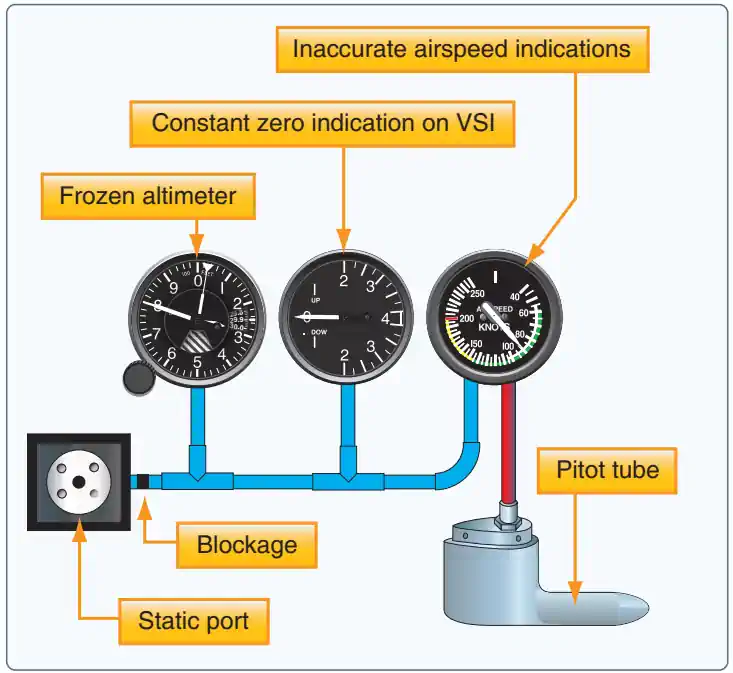
Static System Blockage:
- Trapped static pressure causes the altimeter to freeze at the altitude where the blockage occurred. []
- Use the alternate static source, if installed, and follow the POH/AFM procedures and correction data.
- If no alternate static source is installed, follow the aircraft's emergency procedures.
- Breaking a conventional vertical speed indicator (VSI) glass face can admit cabin pressure in some installations, but may disable the VSI and introduce indication errors; do not assume this method applies to every aircraft.
- An ILS glideslope provides vertical guidance independent of barometric altitude, but does not replace reliable altitude information for approach constraints and minima.
- Cabin alternate-static pressure is usually lower than outside pressure, so the altimeter typically reads higher than actual altitude; the error depends on the installation.
- If reliable altitude information cannot be restored, advise ATC and prioritize a landing in visual conditions rather than continuing an instrument approach to minima.


Tap a green circle to add a blockage; tap a red X to remove it.
All openings clear.
Blue: static pressure · Red: pitot pressure · Green circle: clear · Red X: blocked.
What is blocking this opening?
Airspeed indicator
Altimeter
Vertical speed indicator
±600 ft/min; demonstration time runs 10× faster.
Instrument readings and explanations
Airspeed indicator
Altimeter
Vertical speed indicator
Based on the Cessna Model 172 maintenance manual, 34-11-00, Figure 201, Sheet 1 (3 July 2006): airplanes without Garmin G1000.
Altimeter Knowledge Check
Choose the knowledge check that matches your current training for Altimeter.

PPL knowledge check
Core Knowledge Review
Review foundational knowledge, key concepts, and practical considerations. Topic: Altimeter.
- Immediate feedback
- Answer explanations
- Account progress tracking
Sport knowledge check
Sport Pilot Knowledge
Review the foundational knowledge and decisions used in sport-pilot operations. Topic: Altimeter.
- Immediate feedback
- Answer explanations
- Account progress tracking

CPL knowledge check
Advanced Application
Apply knowledge to advanced operations, risk management, and aeronautical decision-making. Topic: Altimeter.
- Immediate feedback
- Answer explanations
- Account progress tracking

Instrument knowledge check
Instrument Knowledge
Practice the procedures, systems, weather, and decisions used in instrument flight. Topic: Altimeter.
- Immediate feedback
- Answer explanations
- Account progress tracking

CFI knowledge check
Instructor Knowledge
Review the technical knowledge expected of an airplane flight instructor. Topic: Altimeter.
- Immediate feedback
- Answer explanations
- Account progress tracking

CFII knowledge check
Instrument Instructor Knowledge
Review instrument knowledge at the depth expected of an instrument flight instructor. Topic: Altimeter.
- Immediate feedback
- Answer explanations
- Account progress tracking
Why Take a Quiz?
Quizzes reinforce key concepts, identify knowledge gaps, and build confidence for real-world decisions. Quiz material is representative of the information provided here and is not based on or sourced from the Federal Aviation Administration test bank.
Altimeter Interactive Scenario

The Pressure Change Across the Mountain Route
Track altimeter setting, terrain margin, temperature error, and a suspected static-system problem during one mountain crossing.
Scenario Complete
Altimeter Conclusion
- A barometric altimeter converts static pressure into an altitude indication referenced to the selected setting.
- It does not directly measure clearance above the terrain beneath the aircraft.
- Distinguish indicated, true, pressure, density, and absolute altitude before using an altitude value.
- Use the altitude reference required by the clearance, procedure, or performance calculation.
- Pressure and temperature errors are different.
- Selecting a current altimeter setting does not remove the effect of nonstandard temperature.
- Follow the applicable cold-temperature and abnormal-pressure procedures rather than assuming the displayed altitude guarantees obstacle clearance.
- Cross-check the altimeter before flight and monitor it throughout flight.
- A blocked static source can prevent a conventional altimeter from responding to a climb or descent.
- Use the approved alternate-static procedure and corrections when required.
- GPS altitude and radio-altimeter height are not interchangeable with barometric altitude.
- Use the required barometric reference for assigned altitudes and flight levels.
- Use extreme caution near terrain and obstacles in low temperatures or low pressures.
- Extremely cold air can place the aircraft significantly lower than indicated altitude, especially when the temperature is well below standard.
- Standard sea-level temperature is 15°C (59°F).
- In the standard troposphere, temperature decreases approximately 2°C (3.6°F) per 1,000 feet.
- Apply the applicable instrument, static-system, and cold-temperature corrections.
- Standard sea-level temperature is 15°C (59°F).
- Extremely cold air can place the aircraft significantly lower than indicated altitude, especially when the temperature is well below standard.
- A current local altimeter setting is important even when ATC has not assigned an altitude.
- Accurate altitude information supports VFR cruising altitudes, traffic-pattern operations, and appropriate clearance above terrain and protected areas.
- Obtain and set current altimeter information as required throughout the flight.
- Correct settings mitigate risk where clearance margins are thinner, such as aircraft separation under IFR and terrain and obstacle clearance, particularly in mountainous areas.
- Distinguish these pressure-setting references:
- QNE: Standard pressure setting of 29.92 in-Hg, used for pressure altitude and flight levels.
- QFE: Pressure at airport or runway-threshold elevation, providing a height reference above that datum.
- QNH: Local altimeter setting that makes the altimeter indicate airport elevation at the airport datum.
- When barometric pressure exceeds 31.00 inches of mercury, a NOTAM (Notice to Airmen) will be issued to define the affected geographic area.
- The adoption of a standard altimeter setting at the higher altitudes eliminates station barometer errors, some altimeter instrument errors, and errors caused by altimeter settings derived from different geographical sources
- Air Traffic Organization (ATO) Service Center Directors may authorize temporary waivers to high barometric pressure flying NOTAM requirements within their areas of jurisdiction for emergency supply, transport, or medical services under 14 CFR § 91.144(b).
- Always keep in mind the effects of parallax error.
- Apply the aircraft's published static-system and instrument corrections where required.
- Update the altimeter setting when crossing weather fronts, where pressure can change rapidly.
- ATC provides altimeter information under applicable procedures; pilots remain responsible for using the setting required for their operation.
- The FAA has adopted future interference-tolerance requirements for radio-altimeter-equipped aircraft, with compliance dates beginning in 2030; pilots and owners of affected aircraft should consult current FAA guidance.
Aircraft Altimeter References
- Aeronautical Information Manual (1-1-15) Inertial Reference Unit (IRU), Inertial Navigation System (INS), and Attitude Heading Reference System (AHRS).
- Aeronautical Information Manual (7-2-1) General.
- Aeronautical Information Manual (7-2-2) Barometric Pressure Altimeter Errors.
- Aeronautical Information Manual (7-2-3) Altimeter Errors.
- Federal Aviation Administration (FAA) - Pilot/Controller Glossary.
- Federal Aviation Regulations (91.119) Minimum safe altitudes: General.
- Federal Aviation Regulations (91.121) Altimeter settings.
- Federal Aviation Regulations (91.177) Minimum altitudes for IFR operations.
- Federal Aviation Regulations (91.411) Altimeter system and altitude reporting equipment tests and inspections.
- Instrument Flying Handbook (3-3) Sensitive Altimeter.
- Aircraft Owners and Pilots Association (AOPA) - Density Altitude Quiz.
- Instrument Flying Handbook (3-3) Sensitive Altimeter.
- Instrument Flying Handbook (3-3) Sensitive Altimeter.
- Pilot Workshops - IFR Challenge: Lowball in High Country.
- CFI Notebook.net - Pitot Static System.
- Instrument Flying Handbook (3-3) Sensitive Altimeter.